You pick the room
Join the Streams you care about. Your home feed only ever shows one at a time, so Technology never gets buried under Sports.
Social media handed everyone a single feed and then poured everything into it. Streams gives you one feed per thing you actually care about — twelve of them, each with the people, topics and conversations that belong there.


Free on the App Store and Google Play.
Social media started as a way to keep up with people. Then it merged every interest, every acquaintance and every advertiser into a single scroll, ranked by whatever kept you there longest. You follow a chef, a climber and an old colleague, and the app decides you get none of them today.
Switch with one tap. Nothing bleeds between them.
Join the Streams you care about. Your home feed only ever shows one at a time, so Technology never gets buried under Sports.
Inside every Stream you choose the topics that interest you. The feed narrows to those, instead of guessing from what you paused on.
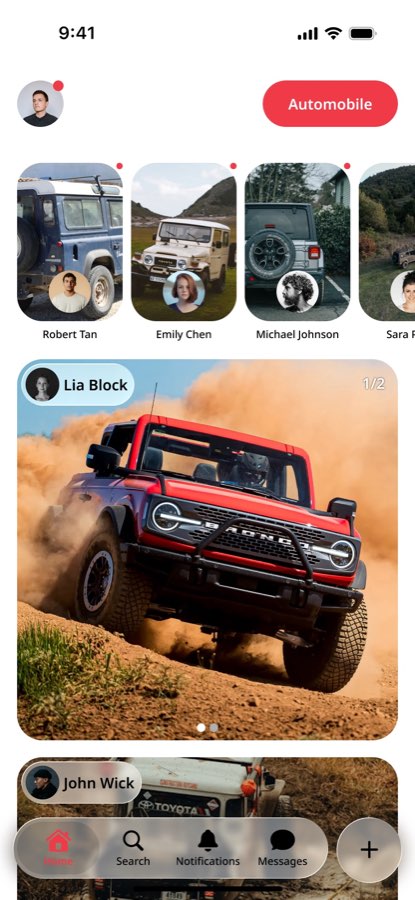
Home is the people you follow, in the Stream you opened. No engagement bait from accounts you have never heard of.
A Stream is a whole feed dedicated to one subject. Join the ones that match your life, pick the topics inside them, and your home screen becomes a set of rooms you can walk between — not one hallway with everything shouting at once.
Cycling through the catalog — tap one
Builders, breakages, and the tools that survive contact with real users.
Home Feed from Figma Streamline · real product design

Join as many as you like. Leave any of them whenever they stop being interesting — more open up as the community grows.
Launch catalog: Technology, Fitness, Music, Food, Design, Gaming, Science, Business, Sports, Fashion & Beauty, Entertainment, Automobile.
Share a moment from your day. It lives for 24 hours at the top of the Stream it belongs to, then it's gone — no archive to curate, no pressure to perform.
Direct messages deliver live over a persistent connection. Requests stay separate from friends, and favourites keep the people you actually talk to at the top.
Write a post and Streams reads it — text and images — to work out which Stream and topics it belongs to. Override it whenever you disagree.
See what's genuinely moving inside a Stream right now, alongside Discover for people and posts just outside your circle.
Split into Pulse, Interactions and Highlights, so a reaction never looks as urgent as a message from a friend.
Sign in with a phone number and a one-time code. No password to leak, no address book upload, no social graph import.
Streams is more than a feed. Clubs hold the conversations, creator tools put work in the right rooms, and the marketplace keeps products next to the people and topics that made them matter.
Clubs give people a place to connect around shared passions, discuss ideas, and build strong communities — without dumping every conversation into one feed.
Creator tools give you everything you need to publish content, build an audience, and grow your presence inside the Streams you care about.
Buy things from your favorite people on the internet — products they create, use, and stand behind — kept in context with the Streams and clubs around them.
Beyond Streams, Clubs, creators, and the marketplace — more surfaces designed to make exploring, creating, and connecting effortless.
Tools for safer, age-appropriate experiences — so younger users get structure, not an open firehose.
Honest takes live next to the Stream they belong in, not buried under unrelated noise.
Claims can be challenged in context, so correction sits with the conversation that needs it.
See what is genuinely moving inside a Stream right now — signal without the virality treadmill.
Ask and answer across communities that actually care about the question.
Pin the moments and surfaces that matter, without turning every screen into a dashboard.
Prefer relevance over interruption. Choose how advertising shows up in your experience.
More features designed to make exploring, creating, and connecting on Streams effortless.
Still curious about something? Email support@streamsapp.io — a person reads every message.
It is a social app — posts, stories, comments, reactions, messages. The difference is structure. Instead of one feed that mixes everything you have ever tapped on, your content lives in Streams you deliberately joined, and you only ever see one at a time.
Yes, as many as you want, and you can leave any of them later — you just have to keep at least one. Your home feed shows whichever Stream is currently selected, and switching is a single tap.
It is posts from people you follow, inside the Stream you have open. Once there is enough tagged content, it narrows further to the topics you picked inside that Stream. It is not a ranking model guessing at your attention.
It reads the text and images to suggest the Stream and topics it belongs in, so it lands where people are actually looking for it. You can always change the Stream before you post.
No. You sign in with your phone number and a one-time code. There is no password to reuse or leak, and we do not import your contacts or your graph from anywhere else.
Yes. Download it from the App Store or Google Play, sign in with your phone number, and start joining Streams — no invite code required.
On iOS via the App Store and on Android via Google Play. Both use the same account once you sign in with your number.
Clubs are communities around shared passions — places to discuss, gather, and stay close to what you love — without dumping every conversation into one mixed feed.
Yes. You can buy products from creators you already follow — Creator Brands, Momentum Picks, and Community Favorites — kept in context with the Streams and clubs around them.
Streams is available on iOS and Android. Install the app, pick the feeds that match what you care about, and leave the rest outside your home screen.
Grab it from the App Store or Google Play. One app for iPhone and Android.
No password. A one-time code gets you in, then you pick the Streams you care about.
Your home shows one Stream at a time — Technology, Music, Fitness, and the rest stay out of each other's way.